Thursday, February 9, 2023

How do you print labels without a computer?

 If you don't have access to a computer, you can still print labels using a label maker. There are two types of label makers available: electronic and manual.


1. Electronic label maker: A manual label maker operates like a typewriter, allowing you to physically type the text onto the label. The label is then ready to be applied to your desired surface.An electronic label maker typically connects to a power source and has a small keyboard for inputting text. You can then print the label directly from the label maker.

Label maker machines are small, portable devices that are designed for printing labels without the need for a computer. They typically have a small LCD screen, a keyboard for inputting text, and a variety of font styles, sizes, and symbols that you can use to customize your labels.


Some popular features of label makers include:


QWERTY-style keyboard for easy text input

Built-in memory for storing frequently used labels

Ability to print labels in a variety of widths and lengths

Various font styles, sizes, and symbols to choose from

Ability to print barcode and serial numbers


2. Manual label maker:


A manual label maker is a small, handheld device that allows you to create and print custom labels. The device is portable and does not require a power source or a connection to a computer, making it ideal for on-the-go labeling. Some popular brands that offer manual label makers include SUPVAN thermal printer E10, Brother P-touch, and Casio KL-60. You can use a mobile app and a compatible wireless printer. Here are the general steps to follow:

① Download a label printing app from the app store. Examples of such apps include Brother iPrint&Label, SUPRINT, and Epson iLabel.

② Connect your mobile device to the same Wi-Fi network as your wireless printer.

③ Open the label printing app and select the type of label you want to print. You can customize the label by adding text, images, barcodes, and other elements.

④ Choose your printer from the app's list of available printers.

⑤ Preview the label and make any necessary adjustments.

⑥ Send the label to the printer and wait for it to print.


Note that the exact steps and features may vary depending on the app and printer you are using. Be sure to check the manufacturer's instructions for specific details on how to print labels with your mobile device.


Both electronic and manual label makers are readily available at office supply stores and online retailers. These label makers can be a convenient solution for individuals or small businesses that need to create labels without access to a computer.

Wednesday, April 18, 2012

Free PDF Editor for Windows Everywhere!

Wondershare PDF Editor for Windows is an innovative tool for users to edit, convert, and annotate PDF files. Different from those so-called “PDF Editors”, which only work with notes or limited page contents, Wondershare PDF Editor allows users to directly edit all the content of the PDF files in any language. What’s more, it also gives users the ability to edit and reuse PDF contents in Word by converting PDF to Word. Marking and annotating PDF files are also very easy with Wondershare PDF Editor.

Features:

  • Split a 500-page PDF file into single-page PDF files within 1 minute.
  • Allow users to combine multiple PDF files into one flexibly and quickly.
  • You can set the properties and security for the merged PDF file.
  • Split PDF file to multiple PDF files by specific page ranges at one time.


How to get a free copy:

1. In order to participate in this activity, you can get this via our event page. You Will direct to this page:
http://studio.wondershare.com/digidoc/topic/PDF_Editor/activity.html

2. Please click to download the beta version of Wondershare PDF Editor. Install it and run the program. Please note that it doesn’t require license code to activate the program.
Note: With this beta version, you will get the first three months for free, without any limit. Use this free trial period for experiencing editing PDF. So, step in and take advantage of this special offer!

Do not miss this great opportunity to try this amazing product, and get this exclusive product for free. You won’t have any charge for the first three months and after that, you will gain access to the lowest available price in the market. If you want to get full version for life time for free, you could also give us three feedback through product or our facebook wall,then you could get PDF Editor full version($59.95) for free for life time.

We hope you take this opportunity to experience the benefits of this fantastic product for free!

CUSTOMER ADVICE:
We are very pleased with your program and your support and will definitely continue working with it. Please keep me informed as to any updates and future products.
I have been looking for this kind of PDF editor with both converter and edit functions for long. Now I can choose to edit my PDFs directly or in Word in order to make my work more efficient. It’s really amazing thanks!

Monday, March 12, 2012

FREE Wondershare Vivideo – Giveaway for 20 Lucky Winners


Wondershare Vivideo, an easy-to-use video editor with all the video editing tools you need, allows you to create Hollywood-like home movies with text, filter, motion and transition effects from all regular videos, audios and photos. Besides, you can directly upload your video to YouTube for sharing with family and friends, save videos for playback on portable devices like iPhone, iPad, iPod, etc. or burn DVD for better video preservation. No matter it's a wedding video, love movie, travel story, life documentary or party record, it is just so easy to turn it to a treasured home video and share it with everyone!

This software is straightforward and easy to use. I have made a home movie with it and am very satisfied with its rich video editing features.

Features

  • Make amazing home movies from all popular videos, audios and photos
  • Edit and personalize videos/audios/photos with editing features like trim, crop, rotate, set volume, adjust duration, etc. for better overall video effect.
  • Retouch your movie with rich filters, text styles, transitions and motions
  • Share your video creation with family and friends in multiple ways


System Requirements

Windows

  • Supported OS: Windows XP/Vista/Windows 7
  • Processor: Intel or AMD processor, 1GHz or above
  • RAM: At least 512M physical RAM

Mac
  • Operating System: Mac OS X 10.5 or later. Fully compatible with Mac OS X 10.7 (Lion)
  • CPU: 1G Hz or above Intel processor
  • Memory: At least 512 MB physical RAM

What they said...

"I own several Wondershare products, and this is another great one!

Great GUI !!
Simple to use !!
Great results !!

Suggestions:

- More appropriate "Help" for this particuliar software:
e.g. It took me a while to figure out what to do to edit & fill in "text".. and the trick w/ the "overlap" text.

- Make PIP user's own pics or vids.

- Have multiple Storyline/Timeline tracks"

Thank you !!! for your quick and kind response. I have already made a couple videos with Vivideo and like the product very much. I appreciate your excellent service and generous offer"From Gary

To celebrating the holiday on this month. Wondershare giving you Wondershare Vivideo for free license key incl serial number full version [Mac and Windows].

Entering the giveaway is simple, you just have to follow the rules below :

  1. Like Digarstudio Facebook page
  2. Tweet about the giveaway and leave one feedback about Wondershare Vivideo.You could also share this post on your facebook wall.
  3. Only be 1 entry per person allowed in this Digarstudio giveaway.

How To Win

Tell us the reason you think you deserve a free license or your sincere advice about Wondershare Vivideo. We love real answers and we sincerely hope that you are free to feedback any shortcomings of our product to our Company, so that we can complete the product quality better and provide you better services.

When Will I Know

Winners will be chosen at the end of this month (March 28th 2012).We will list your name in this article .If your name is on the winner list please contact me at digarstudio(at)gmail.com to get your free license!!

Thursday, March 1, 2012

The last five days Left to get the giveaway version of Wondershare Data recovery!!!

WOW! Get 3 products in the windows for free at a time? No kidding,just join our giveaway activity to get these gifts!!Gifts are limited and available on a first come first served basis! Hurry up!
http://on.fb.me/wY0qf1

Activity Rules

Coolbit Software has debuted 2012 special offer and sales promotion. Just come here and you have 100% chances to get a free product-Wondershare Data Recovery.You will get up to $79.90 Giveaway or up to 80% coupon code for some products on our website.

Below is a step-by-step guide on how to get the free product:

1. "Like" our Facebook Fanpage first to unlock " Get it Free " and get the access to the Giveaway page with product download link.That is to say,you will see one new page of Coolbit website,just click "Get it Free"button again to download the program.After that,you could start to recover your data on your computer by yourself.

2. Besides the giveaway product,we also offer up to $20 instant coupon code or Wondershare PDF to Word for you as long as you leave your suggestion or comment about Wondershare Data Recovery on our Facebook wall. We will send you the registration code of Wondershare PDF to Word after you download it or coupon code to your email address that you provided. (Please note that the coupon code can be used to purchase Wondershare Video Editor and Wondershare Fatashow for Mac)

3.Meanwhile,you could also get Wondershare Vivideo for free by clicking "Share" to share our activity on your wall or publish the giveaway on your twitter successfully.Take action now! Just 100 units! Gifts are limited and available on a first come first served basis!

After you have successfully shared the message on Twitter or Facebook,please leave one message on the giveaway page.

What are you waiting for? Join our giveaway activity to get more gifts!

Kind Notice: Please note that this version of Wondershare Data Recovery provides 100 MB space for you to recover your lost files and it doesn't require license key to activate it.Please don't worry,you can confidently use the unregistered program as long as the lost file size doesn't exceed 100 Mb.

If you want to get more free 100MB,you could choose to share the software on your Facebook or Twitter.You could see the details when launch the software.Please note.


Thursday, January 12, 2012

Get Free Wondershare Video Editor software now facebook activity is coming!

If you are a beginner want to make professional-looking personal movies, Video Studio Express provides you with a complete set of tools to edit videos and share your final production on your iPad, iPhone 4, iPod, PSP, Blackberry, HTC, Zune and other portable device.


Wondershare Video Editor is a powerful video editing software for you to compile any movie or video projects regardless the size and format in a few simple steps. You can add background music, scene transitions, and stylish movie effects to your video, editing the video and audio track easily.


Let's take a look at what this Wondershare Video Studio Express can do for you:


High compatibility with all popular video and audio formats from your computer and camera
Precise video editing with separate video, audio and add picture-in-picture functionality
Video effects and transition effects make your videos outstanding at once
Multiple ways to share your edited videos with family and friends easily


Now we are planning to build one online community on Facebook so that it will bring us close to our customers and recognize our customer's needs.Would you like to join us on our community?Just click the following link and click "Like" button and then comment the message.The first 100 fans who like our Facebook Page will get the license of our upcoming release of Wondershare Video Editor 3.0 freely.

http://on.fb.me/vZAPFo


We hope to initiate communication with our users and to find interesting ideas or suggestions.Please keep all of the feedback coming, we are listening and really appreciate the time everyone is putting towards helping us build a better social experience.

How to like our Facebook Page?


Please copy the following link to your address bar and then click "Like" button as below.


Wednesday, September 1, 2010

A chinese villager who sells more software daily than you do

This article is reproduced from Max Klein

I was alone in the center of a small Chinese town, the weakly glowing streetlights hardly illuminating the streets. The silence was heavy and absolute. It was different from the eternal light and sound of Shenzhen, and the high elevation gave the air an unusual taste. Things were not the same up here in the mountains, and this strangeness seemed a bit menacing. The roads had been tarred, courtesy of the rich central government who gave special attention to the Chinese minorities, but the villages up here in the mountains of Yunnan province did not have many cars to wear down the roads. So they felt incomplete, and leaves lay about, their crushing beneath my feet giving my walk a strange soundtrack.

A group of men sat in a doorway smoking tobacco from a big bong, watching me walk past with impassive faces. I hurried a bit. What I was looking for was near, I knew. I turned a corner into a small side street, and saw it – the red and blue glow of the humming fluorescent lights, the pictures of the scantily clad lady with big breasts. I had found the local internet cafe.

I walked in through the narrow doorway, squeezing past a young teenage couple holding hands and staring out of the door. The guy had a scar across his forehead, I wondered idly what their story was, it may have been an amazing love story, it could have been endlessly tragic, perhaps they were completely boring. I’ll never know, because I walked into that room and was hit by the combined glow of hundreds of computer screens, different figures danced across many screens in some dance dance revolution clone, colourful websites reflected off the eyes of engrossed guys, smoking men scrolled through the news, cliques of teens starred together at a screen and shouted and laughed. The room was huge and it was filled with people surfing the internet and playing games. The internet cafe, long thought to be dead, had simply retreated here into the mountains, and it fed the local population with all the entertainment they could not afford to have at home.

After the necessary registration with my passport at the counter, I bought an entire night of internet surfing, starting off by checking what was new at TechCrunch. I went through the usual schedule of websites I read, skipping only facebook and twitter, as they don’t work here.

Being the only foreigner in there, I was getting a lot of looks, giggles and yelled out “HELLOs” from the kids around. I expected them to come talk to me at some point, so when someone tapped my shoulder, I was suprised that rather than some spiky haired teenager, it was a somewhat middle-aged smiling man with a cigarette dangling from his lip. He introduced himself with the sentence: “TechCrunch is my favorite website, too”. His english was heavily accented, but good.

I simply looked up at him, unsure what to reply. I didn’t need to say anything, because he started talking to me about the last few articles he had read on TechCrunch. I got only a few sentences in, mostly in agreement with his somewhat unusual but pretty insightful opinions about what they wrote. He spoke as if he had never spoken to anyone about TechCrunch, and needed to get all his thoughts out.

After 30 minutes of mostly listening, he invited me out to have a drink with him and his friends. He excitedly made phone calls in the local dialect and we went out. We walked over to some local food place, and sat outside on plastic chairs, several beers quickly appearing on the table. Soon, several of his friends popped in a shinily new BYD car, and they joined me.

He told me what he does: he sells software. And he sells a lot of software. Every month, he makes more than $5000, which is more than 50 times the average salary where he lives. He told me how he does it, and it’s a bit unusual.

He had learnt how to program from a friend of his. They had both moved to Kunming and started working, but when his dad got sick, he had to go home and farm to keep the family alive. His dad was sick for close to a year, and they needed money. Unable to travel, he had started looking for jobs on Odesk, Rentacoder and such sites based on recommendation from his friend. After writing some software for a client, he noticed something important:

- If he simply looked at the list of software projects available for jobs, he would have ideas on what software to develop.

He did this, and rather than making software for clients, he created his own software products, which he put on the internet. He said that 3 days after he copied a simple idea from the rentacoder list on his website, he was making 2 sales a day. $20 per day, which basically doubled his monthly earnings as a farmer. He continued working on more products and copying more ideas, and soon he had 10 different software that he was selling. Sales were low at the start, but even then for him it was a lot of money.

He kept doing this, cloning software he found that people wanted by looking at open projects on rentacoder, most of his software being related to video encoding. Additionally, he would take open source software, change the way it looked and sell it online. He said he’d get a few refunds, but most people would purchase it without complaining. He said he tried selling Firefox for a while, but sales were very low due to the free competition.

At the moment he’s making more than $5000 a month, and he’s been making it for more than 4 years already. He’s one of the bigger players in the video encoding software market.

As I left, he dropped me off at the local hotel where my friends were. He shook my hand enthusiastically and said he would email me, but that he had to sleep now, because he had to go to the farm early the next morning. Surprised, I asked him why he still farmed. He shrugged and lifted his palms in that typical smiling manner that the villagers there have. “No why!” he said. “I enjoy farming”.

From :http://maxkle.in/a-chinese-villager-who-sells-more-software-daily-than-you-do/

The other topic you may be interested in :

Get Free Daniusoft Video Converter Pro for Mac software

HTC Droid Incredible update to Froyo rolling out far and wide, manual install available

Yeah, the Droid Incredible update was technically already deployed, but you know how these things work: they're usually long, painful phased rollouts designed to limit the damage if something catastrophic happens in the over-the-air push. On that note, we're excited to report that we've gotten a constant barrage of tips today suggesting that the update is now going out en masse -- and as always, the update file's already been sniffed out for you to download if you haven't gotten it on your phone yet and you're as distractingly impatient as we are wmv to mov mac. Let us know how it goes, alright, folks?

Free Daniusoft DVD to iPad Converter for Mac Serial Key Code

SHENZHEN, China, Aug. 19 /PRNewswire-Asia/ — Daniusoft is launching a giveaway of DVD to iPad Converter exclusively for Facebook fans, valid from Aug. 17th to Aug. 31st, 2010. It is good news for those that have spent all of their disposable income on an iPad and want to make full use of it by watching DVD movies on iPad. With the free DVD to iPad tool MAC dvd to mov , users can turn their iPads into portable DVD players.

The free DVD to iPad Converter is available for both Windows and Mac versions. Not only does it allow users to convert and rip DVDs to iPad (including CSS protected DVDs) with a single click. It also comes with various video editing features to customize DVD movies, DVD to mkv mac such as crop, clip, apply effects, and select subtitle and audio track.

How to get the free DVD to iPad tool?

Step 1: Find Daniusoft on Facebook (http://www.facebook.com/Daniusoft), click ‘Like’ to become its fans.

Step 2: Select a tool you want (Windows or Mac), leave your name and email address and then click ‘Get Keycode’.

Step 3: Check out the email address you left and there you will find the keycode for your selected tool.

What’s more, if you like this giveaway, you can also share it with friends. And you will get $10 discounts on any software you want at Daniusoft.com.

For more information, please visit: http://www.daniusoft.com/giveaway/free-dvd-to-ipad.html.

About Daniusoft Studio

Founded in 2007, Daniusoft Studio is a leading multimedia software provider, offering digital video and audio conversion solutions to customers around the world, and now serves both Windows and Mac users. And the product line ranges from Mac Video Conversion Tools, DVD Ripping Tools, DVD Authoring Tools to Media Device Tools.

Website: http://www.daniusoft.com/

SOURCE Wondershare Software Co., Ltd.


Tuesday, August 31, 2010

How to Convert WMV to MOV on Mac OS X (Snow Leopard included)?

Lots of my friends edit their camera videos via Windows Movie Maker, and the output file format is WMV. Once they share these WMV videos to me, I have to convert WMV to MOV on Mac so that I can play them on my Mac. So I am looking for the best software that can convert those WMV videos to MOV on Mac OS X and watch them with QuickTime player, and transfer them into my iPod with iTunes.

Daniusoft Mac Video Converter is such a WMV to MOV Converter for Mac, which provides easy solution to convert WMV files on Mac to MOV with high-quality output file and high conversion speed. It also provides optimized presets for MOV format. What's more, it can convert other video formats such as AVI, MPEG, FLV, and MKV to Mac video format MP4, M4V, MOV, without losing the high quality of the source files.
3 simple steps to convert WMV to MOV on MacOS X

1. Load WMV video files to this Mac WMV to MOV Converter

Run Daniusoft Video Converter for Mac, drag the video files directly onto the interface.

WMV to MOV Mac
2. Select "Common Video" in output format list

Click "Format" and choose "MOV- QuickTime(*.mov)".

MOV Quicktime format

Click "Settings", Encoder choose "H.264" and all parameters will be automatically set for H.264.

MOV settings

You can learn more: How to edit, crop, trim WMV, MOV video files and capture pictures on Mac OS X ?

3. Convert WMV to MOV on Mac OS X

After choosing the format, you just need to click Start Conversion button to start Mac WMV to MOVConversion.

Monday, August 23, 2010

Daniusoft Video Converter Pro for Mac Save: 49% Now

Daniusoft Video Converter Pro for Mac

Daniusoft Video Converter Pro for Mac is an all-round solution to convert between SD/HD video & audio formats and rip DVD with best quality and super high speed on Mac OS X. It also grants you the ability to customize video/DVD like clip/merge files, crop frame size, apply effect and add watermark. Easy, fast and reliable, this professional video converter enables you to complete the DVD/Video/Audio conversion with a single click.

Feature Highlights:

  • Convert all pop video & audio formats, including HD videos
  • Rip DVD to the right format for portable devices like iPod, iPhone, iPhone 4, iPad, PSP, etc.
  • Basic video editing tools for your need, such as cropping, trimming, video adjustments and watermark
  • Multi-core processor support to maximize the conversion speed
  • User Comments:

    Exceptionally easy to use and very efficient. Makes my conversions a breeze. I like the options available for setting the bitrate and codec.

    Overall, I am very satisfied with both performance and convenience.

    I tried ripping DVD on Mac and its pretty fast and easy few click operation. I like the nice, clean user interface and one click buttons.


System Requirement:

  • Mac OS X 10.5 or later, Intel processor/li>

Wednesday, August 11, 2010

Daniusoft Launches New DVD Ripper for MAC [Daniusoft Announces a New DVD Ripper for the MAC Users]

Daniusoft of China has unveiled a new DVD ripper for the MAC, a new and all-around solution that should come in handy for people who want to rip, convert and edit DVDs. The new DVD ripper from Daniusoft comes with a new interface that is also easy to use.

mac dvd ripper screenshot

The Daniusoft DVD Ripper

can convert multiple DVDs at a time, comes with support for 5.1 Surround Sound, uses the SWF as its output format.

The new ripper comes with provisions for easy editing and is further backed by multi-core processor support to maximize conversion speeds.

Users do not need to be expert in video formatting. A wide range of presets are provided for hassle-free conversion.

This includes, DVD to iPad Mac, iPod, iPhone, iPhone 4, iPad, Apple TV, PSP, Android phone and other devices. Users just have to select the device/format and this Mac DVD Ripper will do the rest.

The Daniusoft DVD Ripper for Mac is priced at $39.00 and is fully compatible with Mac OS X Snow Leopard 10.6.

Google hit with Nexus One sales model complaints

Google support forums are awash with people looking for help for problems with their Nexus One phones -- and unable to find it.

The volume of complaints points to a problem that Google faces now that it has decided to try to push a new cell-phone-buying model in the U.S. Since most people buy subsidized phones from a mobile operator, they turn to the operator when they have problems.

[ Stay up on tech news and reviews from your smartphone at infoworldmobile.com. | Get the best iPhone apps for pros with our business iPhone apps finder. | See which smartphone is right for you in our mobile "deathmatch" calculator. ]

But Google is selling the phone directly to end-users. That means many users are turning to it first, and the search giant doesn’t have the kind of customer support that mobile-phone users are accustomed to.

Google appears to be only accepting e-mail customer queries, to which it pledges to reply in one to two days -- far too long, say most people who are complaining online.

Many people are also turning to T-Mobile and HTC, but getting little help there. T-Mobile is often referring people back to avi to wmv mac either Google or HTC for answers to questions. HTC is often referring people back to T-Mobile, according to complaints online.

One customer going by the name Roland78 said he was transferred between T-Mobile and HTC four times, spending a total of one-and-a-half hours on the phone with customer service. "T-Mobile also said Google hasn't provided them with any support documents for the phone. Welcome to direct sales Google!” he wrote.

Another using the name SouthFlGuy was also sent back and forth between HTC and T-Mobile after finding no help from Google. "I guess I was under the wrong impression but I thought Google would handle the service on the phone," he wrote.

Several people on one thread regarding poor 3G performance on the phone report being told by HTC customer service people that the Nexus One doesn’t support 3G, although the phone does. Another got an e-mail response in five hours from Google suggesting that the user try restarting the phone to see if that solves the problem.

More than 425 comments are listed on a thread about service eligibility issues. Some of them are from people DVD to MOV Mac who say that they ought to be eligible for the subsidized price of the phone but the Google sales site says they aren’t. Many others are simply complaining of a policy that requires even longtime T-Mobile customers to pay more for the phone Mac DVD to mkv than new customers.

Yet others on the site complain about placing an order and failing to get even an order confirmation three days later.

Google, T-Mobile and HTC did not immediately reply to requests for comment.


Monday, August 9, 2010

Tutorial OSX DVD to MKV -How to rip dvd to mkv with subtitles and audio?

"I'm a Mac user. I have mountains of DVD disc and recently bought a WD-TV HD Player. So I want to convert all DVDs to some format in order to play on my HD player. The reason I don't want to convert them to AVI is because somewhere I read that if I convert DVD to MKV files, it will carry all the subtitles and bonus features of DVD too. But how do I convert DVDs to MKV files on Mac and What is the best DVD to MKV Mac converter"?"


What is MKV?

MKV( Matroska Multimedia Container) is an open standard free container format, a file format that can hold an unlimited number of video, audio, picture or subtitle tracks inside a single file. It is intended to serve as a universal format for storing common multimedia content, like movies or TV shows. Matroska file types are .MKV for video (with subtitles and audio), .MKA for audio-only files and .MKS for subtitles only.

Best Five MKV Players

Why we need to convert DVD to MKV with subtitles Mac ?

Many people met the same problem that when they convert DVD to video and watch it on laptop or Mac, the quality gets bad. As we known, a DVD movie is often 8 GB in size. If we convert them to ordinary video formats, the size would be hundreds of MB.So we have to face the problem that the code compression would destroy most of unimportant data and video quality gets bad. How to resolve this problem? In fact, we can decrease the damage by converting DVD to MKV or other HD videos formats. These HD videos are often bigger than standard video and keep higher quality. In addition, if you convert DVD to MKV on Mac, it will carry all the subtitles and bonus features of DVD.


What we need to convert DVD to MKV for Mac


If you want to convert DVD to MKV movies with subtitle on your Mac book and share with your family, you need a Mac DVD to MKV Converter. Well, Daniusoft Mac DVD Ripper would be perfect for you. Because it's very easy to rip dvd to mkv with subtitles and audio .and this Mac dvd to mkv converter is a free trial application for Mac OS x that accomplishes this task quickly and easily.More detailed about instruction ,please kindly refer to This DVD to MKV conversion guide FOR Mac USER


Related articles:


DVD to MOV iPad osx
DVD to AVI Mac


Mac DVD to iPad
Mac flv to ipad


AVI to MP4 on Mac
MKV to AVI


AVI to MPEG Mac
AVI to WMV on Mac


AVI to DVD Mac
WMV to DVD on Mac


Technorati :

Thursday, August 5, 2010

Apple announces new iMacs, Mac Pro, 27″ Cinema Display, Magic Trackpad

As has been rumoured for some time, Apple has today announced a slew of product updates and entirely new products.


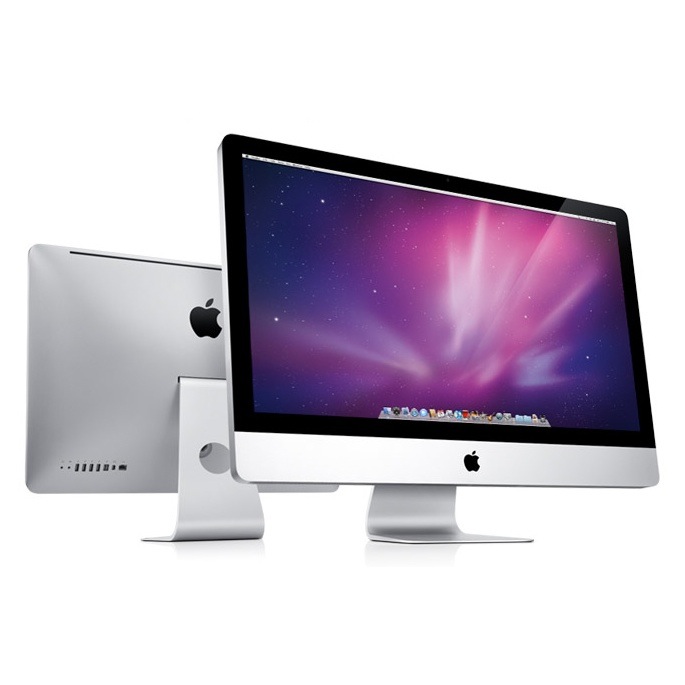
imacsUpdated iMacs featuring new Intel Core i3, i5 & i7 processors


The iMacs received an update, with overall cosmetics remaining unchanged, but under the hood are a new range of Intel processors from the entry-level Core i3 right up to a newer Core i7 with Hyper Threading. New graphics processors AVI to MPEG Mac are also present in the form of the ATI Radeon HD 4670 (21.5″ only) and 5670 (21.5″ & 27″) with 256MB GDDR3 and 512MB GDDR5 memory respectively. The top-end quad-core specification 27″ iMac is configured with  MKV to AVI an ATI Radeon HD 5750 with 1GB GDDR5. Like the Mac Pro, SSD drives are now also Mac Video Converter available as a CTO option.


12-core Mac Pro with 2TB SSD drives CTO option


Mac ProApple’s Mac Pro powerhouse computers had been starved of an update, but finally got a healthy refresh with new processor configurations including the new “Westmere” Intel Mac DVD Ripper Xeon processors, running at up to 2.93GHz in a dual processor configuration with 6 cores each, deliver up to 12 cores.


Hard drive options now include, for the first in an Apple desktop, SSD drives, with configuration options allowing up to four 512GB SSD drives. Apple has posted test results showing SSD’s outperforming 7200RPM HDD’s by up to twice the speed, although Mac AVI to WMV it hasn’t posted any comparable FLV to iPad Mac results against 15,400RPM SAS HDD’s.


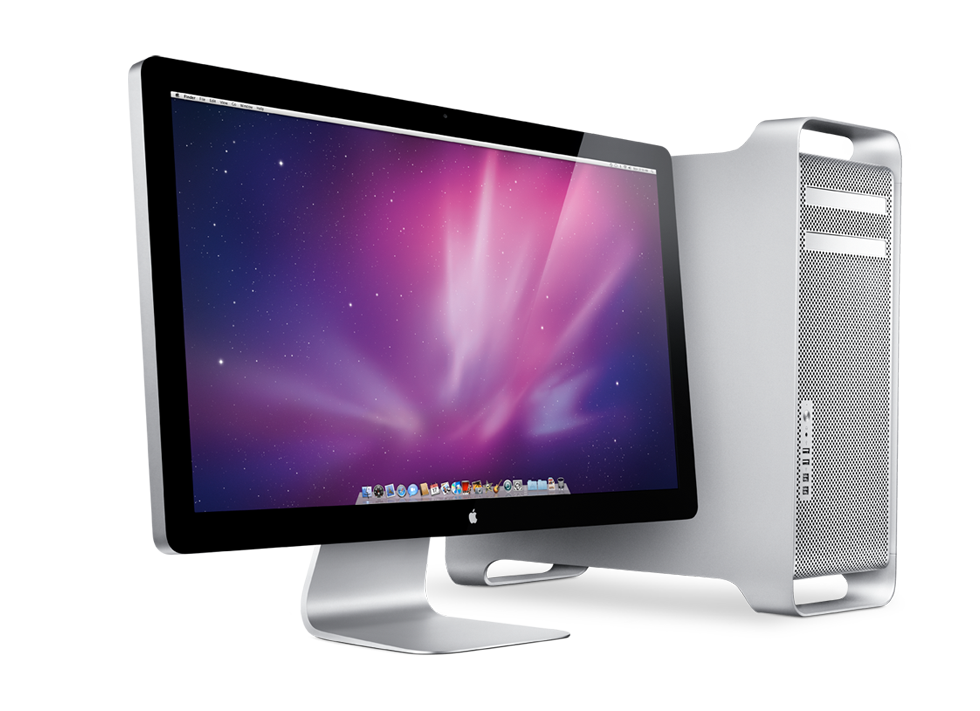
27″ LED-backlit Cinema Display


Cinema DisplayBased on the same IPS panel as used in the current generation iMac, a new 27″ Cinema Display has been announced for a September shipping date, and features the same style housing as the existing 24″ LED Cinema Display. With a 2560×1600 resolution which almost matches the 30″ Cinema Display, the new 27″ Cinema Display is Apple’s first standalone monitor to feature a 16:9 aspect ratio, compared to the previous 16:10 offerings.


Like the 24″ Cinema Display, the new 27″ monitor also features built-in iSight camera, microphone, speakers including subwoofer, and utilises the industry-standard Mini DisplayPort. Mkv to dvd on Mac The connections also include a MagSafe adaptor for charging Macbook models via the monitor’s power source.


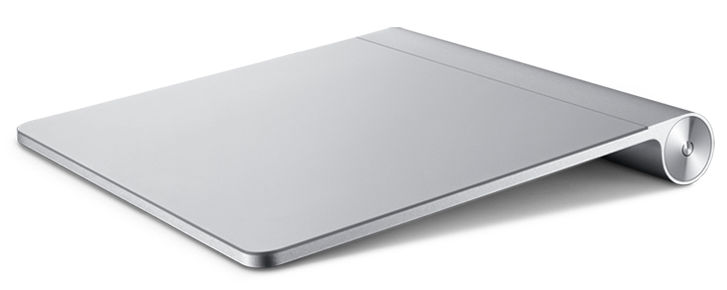
Magic TrackpadMagic Trackpad


Another entirely new product, the Magic Trackpad is Apple’s offering to desktop users of a trackpad, just like the ones found on Macbook video conversion software models, so that desktop warriors can take advantage of multi-touch gestures too, like their mobile-using counterparts.

The new Magic Trackpad is 80% larger than standard trackpads found on Macbooks, avi to dvd mac and the whole pad area acts as a mouse button click too. The design is based on the same structure as the Apple Bluetooth keyboard.

Combined with useful 3rd party tools such as BetterTouchTool (based on the MultiClutch project), the Magic Trackpad could add a nice new ‘touch’ to desktop Macs… pun intended. Sorry Put movies to ipad.

iPhone 4 Unlocking Tool Now Available

The first iPhone 4 unlocking tool has been released. Version 1.0-1 of ultrasn0w provides iPhone 4 , 3G and 3GS owners the ability to carrier unlock their iPhone to work across multiple providers.

While in some countries customers may be able to buy unlocked iPhones, most iPhones come locked to the specific mobile carrier. The process of "unlocking" the iPhone allows you to use the same phone across other GSM mobile phone DVD to mov mac carriers. In the U.S., however, options for alternative carriers are limited as T-Mobile is the only other GSM-based carrier and they do not even support the iPhone's 3G data network. In order to unlock your iPhone Mac DVD to mkv , you must first be Jailbroken.

Users should, of course, proceed at their own risk, as none of these procedures are sanctioned by Apple who warns that any issues caused by these procedures could violate your warranty.

Monday, July 12, 2010

How to Import DVD to iMovie, DVD to iMovie 09, iMovie HD?


Jul 12, 2010 - If you also are looking for ways to import DVD to iMovie, you should learn that iMovie only reads MP4, MOV video. Unless you rip DVD movies to Mp4 or MOV, there is no other way to import DVD to iMovie.


Below is the step by step guide on how to rip DVD to iMovie 09.
Step1. Download and install DVD Ripping software Mac


Then, just insert your favorite DVD on the DVD-ROM and load your DVD files to Daniusoft DVD Ripper for Mac through "Load DVD". Alternatively, you can hit "Load IFO" to import IFO files. In a minute, your DVD files will be listed at the main panel. There you can learn your original video duration and trimmed video duration if you have trimmed your DVD movies.


Step2. Output Setting
Select "MP4" from the output formats list in "format" drop-down list. Go to "Output" to set the output directory to save the converted files. You can also adjust other settings such as video quality, audio track, Bitrates, aspect ratio, brightness, contrast, saturation, etc.


Step3. Rip DVD to iMovie (MP4) on Mac
When the settings are done, click the button to start conversion. And then the program will automatically start to convert DVD to iMovie file. That's all. When the conversion is finished, you can click "Open" to locate the file in your hard drive. If you don't want to wait around during the conversion, the smart program can switch off the computer automatically when the conversion is done.


It's just so easy to rip DVD for iMovie and import DVD to iMovie 09, iMovie HD, so why not download Daniusoft DVD Ripper for Mac for iMovie to make a fantastic movies?

Quoted from :http://www.daniusoft.com/tutorial/dvd-to-imovie.html#207


Related articles: DVD to WMV Mac


DVD to iMovie


DVD to MOV


DVD to youtube


DVD to VOB


DVD to iPod Mac


Technorati :

Thursday, July 8, 2010

How to Import DVD Movies to Final Cut Pro on Mac OS X


Jun 29, 2010 - I'm doing an editing project in Final Cut and have to make
a 1-2 clip from A DVD movie of my choice, so is there a way to insert a DVD and
capture video from a DVD?
What's Final Cut?


Final Cut Pro(FCP) is a
professional non-linear editing software application developed by Macromedia
Inc. and then Apple Inc. Final Cut Pro 7 will only run on Mac personal computers
running Mac OS X version 10.5.6 or later and using Intel processors. It is a
module of the Final Cut Studio product. The software logs and captures video
onto a hard drive (internal or external), where it can be edited and processed.


How to convert DVD to Final Cut Pro on Mac

Some people maybe
meet the difficulties of editing videos from DVD in Final Cut Pro.There is
really one software available to rip DVD to Final Cut for editing videos whether
you are using a Mac OS X or Windows based system.
So How to import DVD to
Final Cut on Mac OSX? Today, we will show you the detailed guide step by step.


Step1. Download and install DVD to FCP Converter for Mac


Download DVD to FCP converter and running it, and then load the DVD
movie from your Mac or DVD Driver. Alternatively, you can hit "Load IFO" to
import IFO files. In a minute, your DVD files will be listed at the main panel.
There you can learn your original video duration and trimmed video duration if
you have trimmed your DVD movies.

Step2. Output Setting

You can
select " MOV - QuickTime (*.mov)" which is compatible with FCP from the output
format list in "Format" drop-down list. And the output directory to save the
converted files in "Output" drop-down list. You can also adjust other settings
such as video quality, audio track, Bitrates, aspect ratio, brightness,
contrast, saturation, etc.

Step3. Import DVD to Final Cut Pro on Mac


When the settings are done, click the Conversion Button button to start
conversion. And then the program will automatically start to convert DVD to MOV
for Final cut Pro. That's all. When the conversion is finished, you can click
"Open" to locate the file in your hard drive and simply import the MOV file into
Final Cut Pro for editing.

More info,please refer to http://www.daniusoft.com/convertdvd/dvd-to-final-cut-pro-mac.html#207


Related articles:


Technorati :

Tuesday, June 29, 2010

Convert DVD to mini DV on Mac for Final Cut Pro and iMovie


Final Cut Pro (FCP) is a professional non-linear editing software application developed by Apple Inc., supporting various video formats including DV, HDV, P2 MXF, and 2K film format. If you want to convert DVD to DV on Mac for editing tool Final Cut Pro, you need a right tool to help you do that.


Daniusoft DVD Ripper for Mac is specially designed for Mac users to help them convert DVD to video and audio formats like DV, MP4, AVI, MOV, 3GP, MPEG, H.264/AVC, MP3, WAV, AAC, AC3, while maintaining the high quality of DVD. It also serves as a perfect DV Ripper Mac for converting DVD to DV for Mac only with three steps.


Below is the step by step guide on how to convert DVD to DV for Mac


Step1. Download and install DVD to mini DV software Mac


Then, just insert your favorite DVD on the DVD-ROM and load your DVD files to Daniusoft DVD Ripper for Mac through "Load DVD". Alternatively, you can hit "Load IFO" to import IFO files. In a minute, your DVD files will be listed at the main panel. There you can learn your original video duration and trimmed video duration if you have trimmed your DVD movies.


Step2. Output Setting


Select "DV" from the output formats list in "format" drop-down list. Go to "Output" to set the output directory to save the converted files. You can also adjust other settings such as video quality, audio track, Bitrates, aspect ratio, brightness, contrast, saturation, etc.


Rip DVD to DV on Mac – Set the output format


Step3. Convert DVD to DV on Mac


When the settings are done, click the Conversion Button button to start conversion. And then the program will automatically start to convert DVD to DV file. That's all. When the conversion finished, you can click "Open" to locate the file in your hard drive. If you don't want to wait around during the conversion, the smart program can switch off the computer automatically when the conversion is done.


While the conversion from DVD to DV for Mac is completed, you can simply import the DV to FCP or iMovie to edit it and enjoy the creation of your own masterpiece.


Technorati :

Friday, May 28, 2010

How to Put a DVD movie On Your Sony Ericsson w580i on Mac OS X


I just purchased the Sony Ericsson w580i; I want to convert a few DVDs so I can watch them on my phone. The problem is that I don't know the first thing about doing it. What format will I need to convert the DVD?
-- from U.K Pin


580i.jpg


The Sony Ericsson w580i is one of Sony Ericsson's lines of Walkman-branded handsets. These music focused phones are popular globally, but few of them have made it to the United States. The W580i is one of the few that has, carried by AT&T. And it's a good pick for the carrier;


The sound quality through the included stereo earbud headphones is superb and if you turn on the MegaBass boost feature in the Walkman player, the phone outputs full and powerful sound that booms. The W580i also has support for A2DP which allows the phone to play music via Bluetooth to stereo headphones. Like other Walkman phones, the W580i supports music files in the MP3/AAC/AAC+/e-AAC+) formats and you can rip music CDs using the included Disc2Phone software for Windows or using Sony Ericsson DVD ripper for Mac


Want to watch DVD Movie on Sony Ericsson w580i

The Sony Ericsson W580i has a 2" QVGA display that's capable of displaying 262K colors. Pictures, videos and music visualizations look good and the screen is amazingly usable outdoors even in direct sunlight. Have you ever tried to upload DVD to Sony Ericsson w580i? The following tips will be your Sony Ericsson w580i's assistant to help you get more fun to watch DVD movies on your Sony Ericsson w580i for Mac user


Before converting DVD to Sony Ericsson w580i, you should get to know about what kinds of formats are supported by our Sony Ericsson w580i phone. Here I list all the supported video /audio formats playable on Sony Ericsson w580i Smartphone


Video/audio formats supported by Sony Ericsson w580i:
* Video clips in MP4 (generally MP4 is preferable with better picture quality), 3GP
* Music/audio files in MP3, MP4, AAC, WMA, WAV, AMR act.


Below is the detailed tutorial about how to Convert DVD to Sony Ericsson w580i on Mac


Step1 .Download and install DVD Ripping software Mac and running it and then load the DVD movie from your Mac or DVD Driver.
Step2 .Select Output Setting Select "MPEG-4 Movie (*.mp4)" from the output format list in "Format" drop-down list. And the output directory to save the converted files in "Output" drop-down list. You can also adjust other settings such as video quality, audio track, Bitrates, aspect ratio, brightness, contrast, saturation, etc.


Step3 .Convert DVD to Sony Ericsson w580i on Mac When the settings are done, click the "Start" button to start conversion. And then the program will automatically start to convert DVD to Sony Ericsson w580i .that's all. When the conversion is finished, you can click "Open" to locate the file in your hard drive.


Finally, just put the converted DVD to Sony Ericsson w580i, and now you can enjoy DVD movies on your Sony Ericsson w580i phones anytime and anyplace. You can also convert some part of the DVD to Sony Ericsson w580i or convert DVD to the other portable player compatible formats. Would like to know more supported format, Please click hereDVD to Sony Ericsson w580i Mac, DVD to Sony Ericsson Mac


Thursday, May 27, 2010

How to watch DVD movie On Your Android Phone Motorola Droid and HTC Hero on Mac OS X

"I have a DVD disc for my business that I would like to burn to my Android phone so I can show clients. I believe on Android devices I have to convert the video to an mp4 (not totally sure). I used VLP player to burn the DVD to my documents and now want to convert and transfer to my phone. Thanks for your help!"
-- from USA Steve

Which is the Best Android Phone on Each Carrier?


The best Google Mobile applications are available for phones that run the Android operating system. It's not only Google, but Motorola, Android, Sony Ericsson and the other famous manufactures have been kept on Android phone. According to the best Android phones review, five of the best Android phones on the market today, including the Motorola Droid, Android Droid Incredible, and Google Nexus One.


There are a few classic films DVDs in home that we would like to see on a big screen during a trip, such as our Android phone. But How to put a DVD movies on your android phone? There is a short tip for you to enjoy videos on your Smartphone


How to convert DVD to Android Phone on Mac -Copy DVD to Android Phone on Mac


Step1 .Download and install Android DVD ripper and running it, and then load the DVD movie from your Mac or DVD Driver.


Step2 .Select Output Setting Select "MP4" from the output format list in "Format" drop-down list. And the output directory to save the converted files in "Output" drop-down list.


Step3 .Convert DVD to Android Phone on Mac,When the settings are done, click the "Start" button to start conversion. And then the program will automatically start to copy DVD to Android Phone on Mac


Finally, just put the converted DVD to Android Phone, Motorola Droid and HTC Hero, and now you can enjoy DVD movies on your android phones anytime and anywhere. You can also convert some part of the DVD to Android Phone or convert DVD to the other portable player compatible formats. Would like to know more supported format, Please click here


Get Free Android DVD ripper for Mac

Technorati : , ,